
FIXD OBD2 Scanner
FIXDAuto & Vehicles
4.013.34K Reviews
- Version
- 26.22
- Installs
- 1.00M
- Age Rating
- Everyone
Screenshots
Our Review of FIXD OBD2 Scanner
 Analysis by Appyee
When a warning light appears, I want to know whether I can keep driving, whether I should book a repair, and what to tell the mechanic. That is the practical question behind using FIXD OBD2 Scanner: it aims to turn a car’s diagnostic information into something an everyday driver can understand, rather than leaving me to guess at a dashboard symbol or search through technical code descriptions.
That makes it most useful as a first step, not a substitute for a workshop. I’d consider it if I own a car with a compatible OBD2 port, want a clearer picture of a warning, or need a nudge to stay on top of routine maintenance. If I already have access to professional diagnostic equipment or want to repair complex faults myself, I’d look at other options too.
What I would check before choosing it
The first decision is whether the app suits the way I actually deal with car trouble. If I mainly want help understanding a check engine light before calling a garage, a plain-language explanation can be more useful than a list of codes. If I need detailed information for advanced troubleshooting, an approachable summary may not answer every question I have.
There is also a hardware step to factor in. The app works with a FIXD scanner plugged into the vehicle’s OBD2 port, so installing the app alone does not complete the setup. I would check that my car has the relevant port and that I am comfortable using a scanner before relying on it. The port is commonly under the steering wheel, though finding it can take a little patience.
The app is free to download, while in-app purchases range from $0.99 to $119.99 per item. I’d look carefully at any optional purchase and decide whether it addresses a need I actually have. The free price makes it easier to try, but it does not mean every feature or service is necessarily included at no cost.
FIXD is an automotive app from developer FIXD. It has an average rating of 4.2 from around 29,000 ratings, and more than a million installs. It is rated for Everyone, was released on September 17, 2015, and its current version is 26.2. Those details suggest a well-established app, but I would still judge it by whether its explanations and connection process work for my own vehicle.
Where a simple diagnosis earns its place
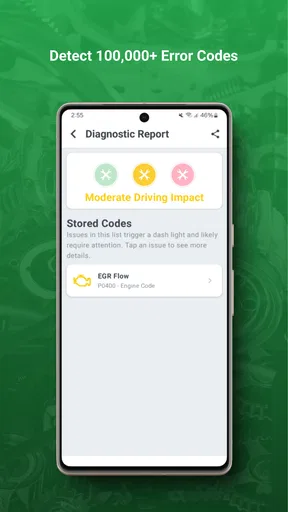
Once the scanner is connected, the main appeal is the gap it can bridge between a warning light and a useful conversation with a mechanic. A code by itself may look intimidating; a plain-language explanation gives me a starting point for asking what needs checking. I would treat that explanation as guidance, not as a guaranteed diagnosis or a repair instruction.
For example, if the check engine light comes on during an ordinary commute, I can use a scan to learn what issue the car has reported before deciding what to do next. I would note the result, pay attention to how the car feels, and contact a qualified mechanic if the warning persists or the vehicle behaves unusually. Having a description ready can make that call more focused, even when I still need a professional inspection.
That kind of use is different from trying to troubleshoot every component at home. The app’s value is in helping me get oriented: it can make a confusing warning less opaque and help me avoid walking into a repair conversation with no context. It cannot establish the full physical condition of the car simply by translating a diagnostic code.
Habits that make the scanner more useful
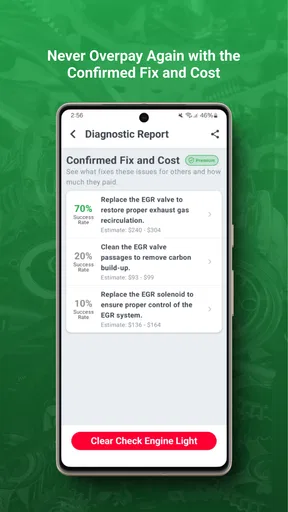
I would scan before clearing a warning, not after. Keeping the diagnostic result gives me something concrete to discuss if the light returns, while clearing it too early can remove a useful clue from the conversation. The option to clear the check engine light is convenient after a confirmed fix, but it should not be used as a way to make an unresolved issue disappear from view.
It also helps to separate an alert from a conclusion. A code points to an area or condition that the vehicle has detected; it does not always identify the failed part with certainty. If a suggested problem seems inconsistent with the symptoms, I would share the code and explanation with a technician rather than buying parts based on an app interpretation alone.
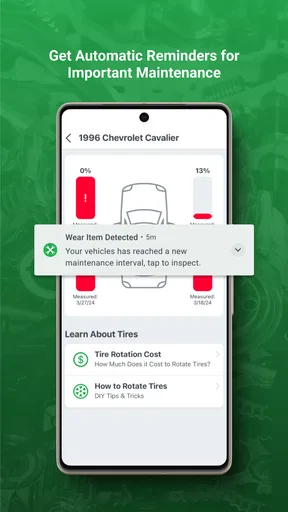
For maintenance reminders, I would use the timeline as a planning prompt and compare it with the vehicle’s service records and recommendations. A reminder can help me remember routine work, but it should not replace the owner’s manual or a mechanic’s advice about a particular car. This is especially useful when several drivers share a vehicle and nobody is sure when the last service happened.
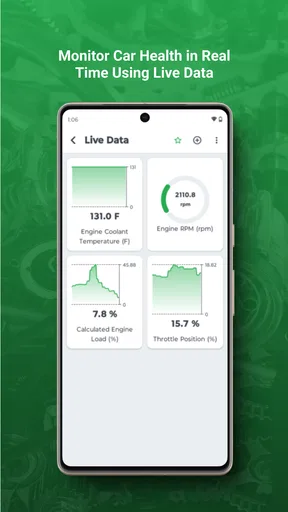
Real-time monitoring can be handy on a longer drive when I want to keep an eye on the car, but I would set it up before setting off and avoid interacting with the phone while driving. It is a better companion for a passenger or for checking while parked than a reason to watch a screen on the road.
How it compares with other ways to check a car
The usual alternatives fall into a few broad groups: asking a mechanic to diagnose the issue, using a basic code reader, or choosing a more advanced scan tool. A mechanic is the better choice when the car has worrying symptoms, a fault is difficult to trace, or a safe repair needs specialist knowledge. FIXD is more convenient for getting an initial explanation at home, but it cannot replace hands-on inspection.
A basic code reader can suit someone who already knows how to interpret diagnostic codes and only wants to retrieve them. FIXD’s more approachable explanations and maintenance timeline may be more helpful to a driver who wants context rather than raw codes. In the other direction, people who need deep diagnostic detail or work on vehicles professionally may prefer specialist equipment designed for that level of troubleshooting.
The trade-off is straightforward: ease of understanding versus diagnostic depth. I would choose FIXD for everyday orientation and maintenance planning, not because it promises to identify every cause. If I want to learn how to investigate repairs in detail, I would compare dedicated tools and reliable technical guidance before deciding.
Connection, compatibility, and the effort involved
After plugging in the scanner, the app connects by Bluetooth. That is a simple arrangement, but it introduces one more link that can occasionally need attention. If the phone does not connect right away, I would check that the scanner is seated properly, keep the phone close, and retry the connection before assuming the car has a fault.
Older vehicles may be less straightforward, and compatibility is worth checking before I depend on the app. The scanner needs a suitable OBD2 port, and the experience can vary with the car and phone. I would test the connection while parked, well before a trip or an appointment, rather than discovering a pairing problem beside the road.
The app is available for Android and iOS, with a minimum operating system requirement of 10. I would confirm that my device meets that requirement and that the scanner is appropriate for my vehicle before treating this as a ready-to-use kit. A phone that cannot run the app, or a car that does not work with the scanner, changes the value of the whole setup.
On the phone side, the learning curve appears modest: install the app, locate the port, connect the scanner, and follow the prompts. Still, anyone who dislikes pairing accessories or troubleshooting Bluetooth may find a wired reader more predictable. That is a personal preference rather than a serious flaw, but it matters if I need a tool I can use quickly without much setup.
Who benefits most—and who may prefer something else
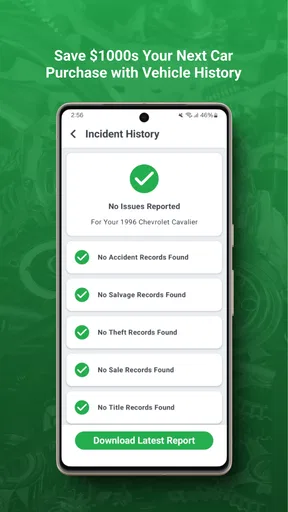
I think this is a good fit for drivers who want more confidence when a warning appears, people who are new to vehicle diagnostics, and households that would benefit from a shared maintenance reminder. It can also help a used-car owner keep diagnostic information in hand when arranging service, provided they understand that a scan is only one part of assessing a vehicle.
I would skip it if I do not want to buy or connect a scanner, if my vehicle is not compatible, or if I need a definitive diagnosis for a serious problem. Someone who already understands OBD2 codes may get more value from a reader that exposes the details they care about. A professional mechanic or committed repair hobbyist may need a more specialized tool instead.
It is also not the right answer to every warning. If the car runs poorly, makes an unfamiliar noise, or seems unsafe, I would not let a reassuring-sounding explanation persuade me to keep driving. The sensible next step is to stop when appropriate and seek qualified help. An app can make information easier to discuss; it cannot judge every risk from a phone screen.
Using FIXD in everyday ownership
First things first, setting up the FIXD OBD2 Scanner is a breeze. You plug it into your car’s OBD2 port, which is usually under the steering wheel. Don’t worry if you’re not sure where it is; the app provides a neat little guide to help you find it. Once connected, all you need is the FIXD app on your Android or iOS device. A quick download, and you're good to go.
The app pairs seamlessly via Bluetooth, and in a matter of seconds, it starts scanning your vehicle for any issues. I was impressed by how straightforward the interface is. It’s like a friendly chat with your car, minus the grease and grime.
What Does FIXD Do?
Now, let’s talk features. The beauty of FIXD is its simplicity. It identifies your car’s problems and explains them in plain English. None of that technical jargon that makes you feel like you need a degree in automotive engineering. Instead, FIXD tells you what’s wrong and how serious the problem is.
One of the features I found particularly useful is the real-time monitoring. You can keep tabs on your car’s health as you drive, which is perfect for those long road trips. It’s like having a doctor on call, but for your car.
Extra Perks
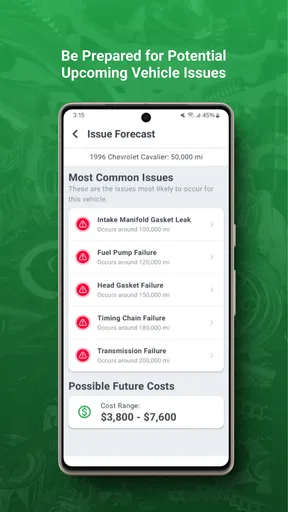
Beyond diagnostics, FIXD offers a maintenance timeline tailored to your vehicle. It sends timely reminders about oil changes, tire rotations, and other essential services. It’s like having a virtual assistant ensuring you never miss a beat in your car’s maintenance schedule.
Another feature that caught my eye is the ability to clear the check engine light. It feels oddly satisfying to see that light disappear after FIXD diagnoses and confirms the issue is resolved. However, it’s always wise to make sure the problem is genuinely fixed before clearing any codes.
What’s the Catch?
While FIXD is fantastic, it’s not without its quirks. The app sometimes struggles with older car models, and the Bluetooth connection can be a bit finicky. Occasionally, I had to reconnect the device to my phone, but it wasn’t a dealbreaker.
Additionally, while FIXD provides excellent insights, it’s important to remember it’s not a replacement for professional diagnostics. It’s a tool to empower you with information, so you can make informed decisions when visiting your mechanic.
Final Thoughts
In a world where our cars are getting smarter, having a tool like the FIXD OBD2 Scanner feels essential. It’s user-friendly, informative, and, most importantly, it gives you peace of mind on the road. Whether you’re a car enthusiast or just someone who wants to save a few bucks at the mechanic, FIXD is worth a try.
So, next time that check engine light decides to pop up, you’ll know exactly what to do. Grab your phone, open the FIXD app, and let the magic unfold. Your car will thank you, and so will your wallet.
Privacy and Permissions
See what permissions an app requests and how it handles your data.
- Location
- approximate location (network-based), precise location (GPS and network-based)
- Phone
- read phone status and identity
- Photos/Media/Files
- read the contents of your USB storage, modify or delete the contents of your USB storage
- Storage
- read the contents of your USB storage, modify or delete the contents of your USB storage
- Camera
- take pictures and videos
- Microphone
- record audio
- Device ID & call information
- read phone status and identity
- Other
- view network connections, pair with Bluetooth devices, access Bluetooth settings, full network access, change your audio settings, run at startup, reorder running apps, prevent device from sleeping, Google Play license check
Verdict
Strengths of FIXD OBD2 Scanner
- Easy-to-use interface for all users.
- Real-time diagnostic updates.
- Compatible with most car models.
- Offers maintenance reminders.
- Includes battery health monitoring.
Limitations of FIXD OBD2 Scanner
- Requires a stable internet connection.
- Limited features in free version.
- Some cars may have connectivity issues.
- Subscription needed for premium features.
- No support for diesel vehicles.
Similar Picks in This Category
View All
Android Auto
Google LLC4.1

maxim — order a taxi & food
PT. SITO4.7

Штрафы ГИБДД: проверка с фото
Pays LLC – Штрафы ГИБДД4.7

Номерограм – проверка авто
Авто Ассист4.8

Дром Авто
Дром4.9

Frequently Asked Questions
What is the FIXD OBD2 Scanner and how does it work?
The FIXD OBD2 Scanner is a diagnostic tool that connects to your car's OBD2 port, allowing you to monitor vehicle health through a smartphone app. It translates over 7,000 error codes into simple terms, making it easy to understand what's going on under the hood. It also tracks maintenance schedules and alerts you to potential issues.
Is the FIXD OBD2 Scanner compatible with all vehicles?
The FIXD OBD2 Scanner is compatible with most gas-powered vehicles manufactured in 1996 or later and diesel vehicles made in 2008 or later. However, it’s recommended to check the specific compatibility with your vehicle model on the FIXD website to ensure seamless functionality.
Do I need a subscription to use the FIXD app?
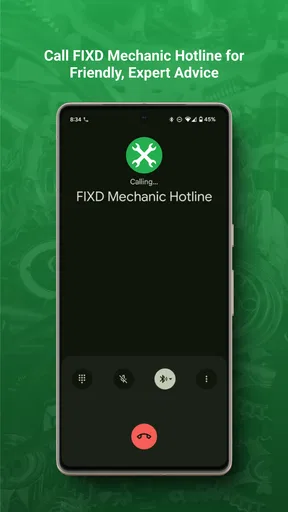
The basic functionality of the FIXD app is available for free, including reading check engine light codes and providing maintenance reminders. However, there is a premium subscription option that offers additional features such as enhanced diagnostics, repair cost estimates, and access to a certified mechanic hotline.
Can the FIXD OBD2 Scanner damage my vehicle?
No, the FIXD OBD2 Scanner is designed to be safe and non-intrusive. It only reads data from your vehicle's onboard computer without altering any settings. It’s a passive diagnostic tool, so it won’t cause any harm to your car's systems when used correctly.
How user-friendly is the FIXD app for beginners?
The FIXD app is designed with user-friendliness in mind, making it accessible to beginners. It features a clean interface with straightforward instructions, translating complex error codes into simple language. The app also provides step-by-step guides and video tutorials to help users better understand their vehicle’s needs.
